Book an Appointment
Call Cave Creek Computer Repair Service at 480-666-5832
                   

(480) 666-5832

*


Cave Creek Computer Repair Service has been providing the best mobile computer repair in Cave Creek, AZ and the greater Phoenix Metro Area since 1999. The term "mobile computer repair" means we come to you to resolve all your computer problems.

We repair laptops, desktops, PCs, and Apple computers. One of our highly qualified staff will come to you, often the same day, to take care of all your repair needs.

Why not use the #1 rated computer repair company in Cave Creek, AZ?

4.9 / 5 stars from 236 reviews
Why use a computer tech when you can have a Cave Creek based Computer Engineer? Mon-Sun 8:00am - 8:00pm

Call us at (480) 666-5832

Text us at (602) 633-4584

Email us your questions

Book an Appointment

"Very impressed - well done. Will highly recommend. Good customer service, no wait time. "
Cave Creek Computer Repair Service 5 / 5 stars
"David was very professional and help me with everything that I needed help on. Very satisfied!"
Cave Creek Computer Repair Service 5 / 5 stars
"William did a great job trying to figure out the Facebook / Google insanity.. I appreciate his efforts.."
Cave Creek Computer Repair Service 5 / 5 stars
"Matt was on time, efficient, listened and responded to what I needed, and extremely helpful. I will use the company's services again in the future."
Cave Creek Computer Repair Service 5 / 5 stars
"Rob explained everything that he was doing and did a great job fixing my computer."
Cave Creek Computer Repair Service 5 / 5 stars

Who is Cave Creek Computer Repair Service?

Cave Creek Computer Repair Service is owned by Matt Karls, an Electrical Engineer and a Computer Systems Engineer. We are a team of computer professionals focused on service and quality, all our work is guaranteed.

If you have any computer, technology or IT problem in Cave Creek, AZ we can fix it. We have been performing computer repair in Cave Creek full time since 1999. Feel free to give us a call at (480) 666-5832 or send us a text message at (602) 633-4584.

Cave Creek Computer Repair Service's Computer Engineer

What is your Service Area for on-site Computer Repair?

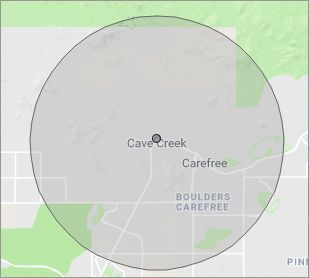
Our primary on-site mobile service area includes Cave Creek, AZ and most of the Phoenix metropolitan area.

We provide remote and mobile computer repair in Cave Creek, Scottsdale, Fountain Hills, Carefree, Paradise Valley, Tempe, Ahwatukee, Chandler, Sun Lakes, Queen Creek, San Tan Valley, Gilbert, Mesa, Apache Junction, Gold Canyon, Phoenix, Glendale, Peoria, El Mirage, Surprise, Sun City, Sun City West, Goodyear, Litchfield Park and Buckeye.

Our on-site Computer Service Area

What should someone expect that hires you for Computer Service?

Our mission is to fully resolve your computer problems quickly and affordably. If you want a Computer Engineer that can fix all of your computer problems instead of a computer tech, a computer geek, a technician or a computer guy that can only fix some of your problems; call us at (480) 666-5832.  

What types of Computer Services do you perform?

We service businesses and business clients in their homes, including:
 
  • Diagnose / repair hardware or software problems
  • Spyware, malware, trojan and virus removal
  • Setup wireless and small business networks
  • Laptop repair, PC repair and Apple repair
  • Hard drive data recovery

Cave Creek Computer Repair Service Contact Information

Cave Creek Computer Repair Service
(480) 666-5832

Book an Appointment

Cave Creek Computer Repair Service is a Karls Technology company
* *
*
*
*
  *
* *


*
*
* * * * * * * * * * * * * * *
4.9 / 5 stars from 236 reviews

"Chris did a great job. Was very polite and worked steadily till all the work was fully completed."

Cave Creek Computer Repair Service 5 / 5 stars

"The service was prompt and professional and the price was right! Thank you very much!"

Cave Creek Computer Repair Service 5 / 5 stars

"Tech took time to install a terabit from an older computer and took the unwanted computer away. Should I need assistance in the future, I will contact."

Cave Creek Computer Repair Service 5 / 5 stars

"Can't say enough of what was right. It was a great experience with wonderful support. I felt the service was well priced and that Matt had my best interests in mind with everything he did. Amazing service and I have already begun referring others."

Cave Creek Computer Repair Service 5 / 5 stars
Best Antivirus Software of 2026: The Ultimate Guide to Cybersecurity Brands

In 2026, the digital threat landscape has shifted. We are no longer just fighting simple viruses; we are defending against AI-generated phishing, sophisticated ransomware-as-a-service, and complex identity theft. Choosing the right antivirus brand is no longer optional—it is the foundation of your digital life. At Karls Technology, we’ve analyzed the top-performing security suites of the […] The post Best Antivirus Software of 2026: The Ultimate Guide to Cybersecurity Brands appeared first on Computer Repair Blog.

Solid-State Buttons on Upcoming iPhones? Maybe!

Next year, the volume and power buttons on the iPhone 15 Pro and Pro Max might be changed to solid-state buttons instead of being able to be pressed down. The Home button of the iPhone 7 was the first to be made entirely out of a solid-state component. This allows thumbprints to be the way […] The post Solid-State Buttons on Upcoming iPhones? Maybe! appeared first on Computer Repair Blog.

Changing Start Menu’s Location on Windows 11

Some users may object to the fact that the Start button and taskbar icons are now centered in Windows 11. Thankfully, this can be remedied. The Start menu can be shifted to its usual location in the lower-left corner of the display. Simply right-click on the taskbar and pick Taskbar settings. Click the expand button […] The post Changing Start Menu’s Location on Windows 11 appeared first on Computer Repair Blog.

Start Menu Customization

A lot of stuff can be shown or hidden in the Start menu within the Windows operating system. This leaves users a bit of wiggle room for customization. By opening the Settings app, you can navigate to the Personalization section. Then when selecting Start, you may toggle the Start menu’s use of your most recently […] The post Start Menu Customization appeared first on Computer Repair Blog.

If You Don’t Have Newest Windows 11 Update

Your PC may not be compatible with the latest version, or you may not have met the system requirements, thus you haven’t gotten the update notification yet. It’s more probable that you’ll run into issues after upgrading to Windows 11 through Windows Update if you haven’t been warned against doing so. The rollout of the […] The post If You Don’t Have Newest Windows 11 Update appeared first on Computer Repair Blog.

Guide to Antivirus Brands in 2024

Karls Technology’s Comprehensive Guide to the Best Antivirus Brands in 2024 In today’s digital age, cybersecurity is more critical than ever. With the increasing number of cyber threats, from malware and phishing attacks to ransomware and identity theft, having reliable antivirus software is a necessity. The market is saturated with numerous antivirus brands, each offering […] The post Guide to Antivirus Brands in 2024 appeared first on Computer Repair Blog.

Helpful Tip: Free Up Space on PC

Media files are the biggest space hogs on a computer’s hard drive. It is suggested to put them away temporarily. Files can be stored in the cloud using OneDrive, a feature built into Windows 10 and Windows 11. The cloud storage space provided by OneDrive makes it simple to copy large files off your local […] The post Helpful Tip: Free Up Space on PC appeared first on Computer Repair Blog.

Apple’s New Automatic Verification Feature

Automatic Verification, introduced in iOS 16, allows users to skip CAPTCHA validation by using iCloud to discreetly authenticate their device and Apple ID. It is no longer necessary to interpret squiggly language or tap on traffic signal graphics to demonstrate whether or not you’re not a bot. According to MacRumors, iOS 16 automatically enables Automatic […] The post Apple’s New Automatic Verification Feature appeared first on Computer Repair Blog.

End of Service for Windows 10 21H1

Windows 10 21H1 will be discontinued in three months, on December 13, 2022, as per a notice sent out to customers by Microsoft. Microsoft announced the end of security updates for devices running Windows 10 21H1 (the May 2021 Update) in an article released on Wednesday. In order to protect themselves from attacks that take […] The post End of Service for Windows 10 21H1 appeared first on Computer Repair Blog.

Windows 11 Remote Desktop Issues

Microsoft is looking into reports of Remote Desktop issues on Windows 11 computers following installation of the Windows 11 2022 Update. According to Bleeping Computer, it is possible that after upgrading to Windows 11 22H2, Remote Desktop clients will either fail to connect, detach unexpectedly, or stop working altogether. Until Microsoft releases official fixes, you […] The post Windows 11 Remote Desktop Issues appeared first on Computer Repair Blog.